
From spreadsheet to return · 4 min read · Updated 10 November 2026
Most returns start as a spreadsheet. Start there.
You already send firms a workbook and collect it back by email. Line4 turns that workbook into a proper return, with checks at the point of submission and a source for every value. AI proposes. Your staff approve. Smaller returns can be set up in an afternoon.
Collections start as a spreadsheet and an email
Most collections do not start with a taxonomy. They start with a workbook someone built, sent to firms by email and copied back by hand.
That workbook already holds what you know: which figures you need, where they sit and how they should add up. What it lacks is structure. Nobody can check it when it is sent, or compare it with last year’s.
Waiting for a formal model of the return before you collect anything is slow. Line4 starts with the workbook you have.
How Line4 sets up a return from Excel
This is regulatory data collection from Excel, with checks at the gate and a source for every value. It takes seven steps.
- 01Upload the workbook you already sendHowever messy it is. Browse every sheet and cell, including merged cells and hidden sheets.
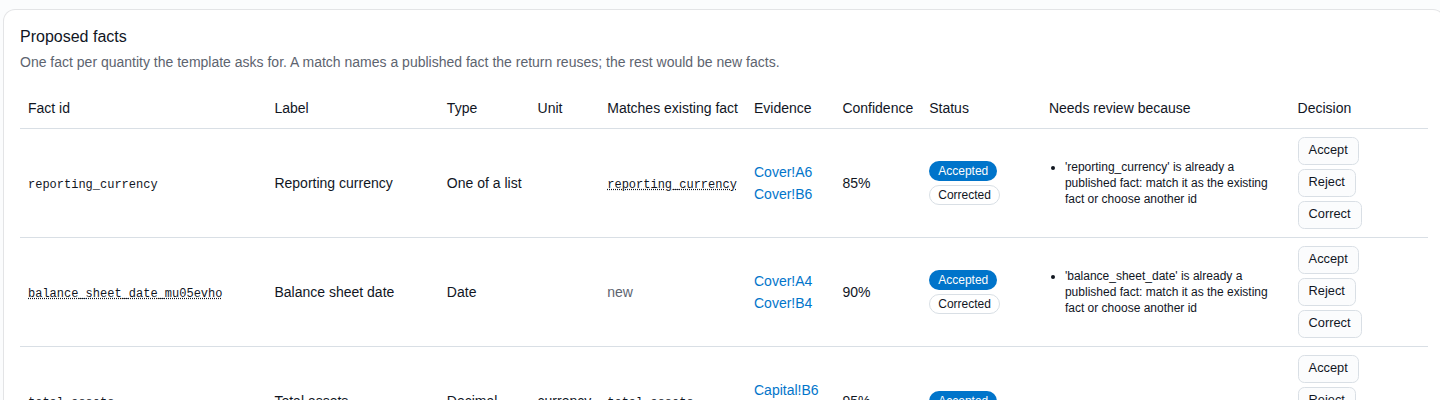
- 02AI proposes the returnIt proposes the facts the template asks for, the cell each one sits in and the checks the data should pass. Where a fact already exists, it proposes reusing it. Every proposal shows its evidence cells, a confidence, its reasoning and which model produced it.
- 03Your staff approve, then publishAccept, reject or correct each proposal. Then publish the return. Nothing is published until a person says yes.
- 04Firms file the same spreadsheet, or a web formFirms download the template, fill it in and upload it, as they do today. Or they use a web form built from the same facts. They see each value read from their workbook, with its cell. Checks stop wrong data before they submit.
- 05Every value keeps its sourceEach value carries its sheet, its cell, the version of the mapping that read it and how it was read. The exact source value is kept, and the same workbook always gives the same result.
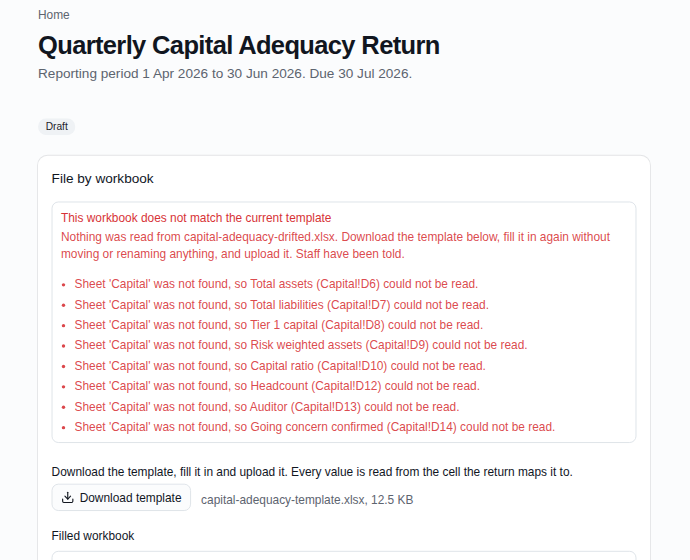
- 06A changed workbook goes to reviewIf a workbook no longer matches the template, it is never read silently. The firm is told what does not match, and your staff see it in a review queue.
- 07Facts, not cellsA fact register shows each fact across firms and periods, whichever return carried it. So a figure stays comparable across returns and across years.
What it looks like
Screens from Line4’s return setup and filing. Demo data only. Tap a screen to open it full size.
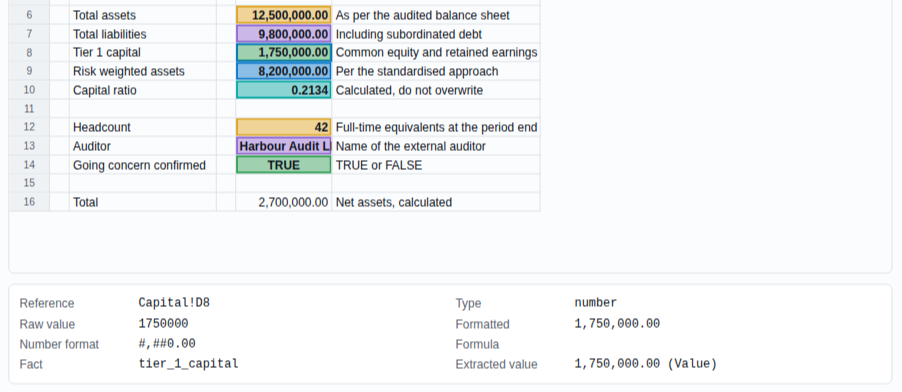
The workbook, with its mappings. Each mapped cell is highlighted. Every value shows where it came from: the sheet and cell, the raw value, its format and the fact it fills.
A workbook that no longer matches. Here a sheet is missing, so nothing is read. The firm is told exactly what does not match, and your staff are told too.
The rule we build by
AI proposes. People approve. The rules run the same way every time.
It is the rule behind all of Line4: AI reads. Rules check. People decide. Here it is applied to setting up a return.
The AI does the slow reading. It finds the figures, suggests where they sit and drafts the checks. It decides nothing. Your staff approve every fact, mapping and check before a return is published.
Once a return is published, its workbooks are read by fixed rules. The same workbook always gives the same result. How we keep AI accountable.
Step one of real-time supervision
Real-time supervision needs data you can check the moment it arrives. A spreadsheet in an inbox cannot be checked until someone opens it. A return set up this way is checked at the point of submission, value by value, with its source.
So the path to real-time supervision does not start with a new standard. It starts with the returns you already collect. What real-time supervision means.
Questions
- Do we need a taxonomy first?
- No. Start with the workbook you already send. Line4 proposes the facts, mappings and checks from it, and your staff approve them. You can bring in a formal taxonomy later if you want one.
- Can firms keep using Excel?
- Yes. Firms download the template, fill it in and upload it, as they do today. Or they can use a web form built from the same facts. Both give you the same data.
- What does the AI decide?
- Nothing. It proposes facts, cell mappings and checks, each with its evidence and a confidence. Your staff accept, reject or correct every one. Once a return is published, workbooks are read by fixed rules, not by the AI.
- How long does a new return take to set up?
- Smaller returns can be set up in an afternoon. Larger returns take longer, because there is more for your staff to review.
- What about XBRL?
- XBRL, the open standard for digital reporting, is one way to bring rules in and one way to send facts out (as xBRL-CSV or xBRL-JSON files). It is not where you have to start. Once your facts exist, an XBRL file is an export. To check an XBRL filing today, try Line4 Check, free to use.
For technical readers: what each value carries
The value from the second screen above, as Line4 records it (demo data).
- Fact
- tier_1_capital
- Sheet and cell
- Capital!D8
- Raw value
- 1750000
- Number format
- #,##0.00
- Value read
- 1,750,000.00
- Mapping version
- The version of the published mapping that read it
- Method
- How it was read, here the cell’s value
Our view
RegTech and SupTech are converging on real-time supervision by 2030. Line4 is built for that: checks at the gate in seconds, AI you can audit, and a switch that takes a week.